Photo edits
Every colour and every fix, without reshooting
Sell a dress in six colours from one photo, or correct one detail in a photo you already like. The edit is designed to keep the face, pose and scene; check fine details before you publish.
Two tools
Other colours and Fix something
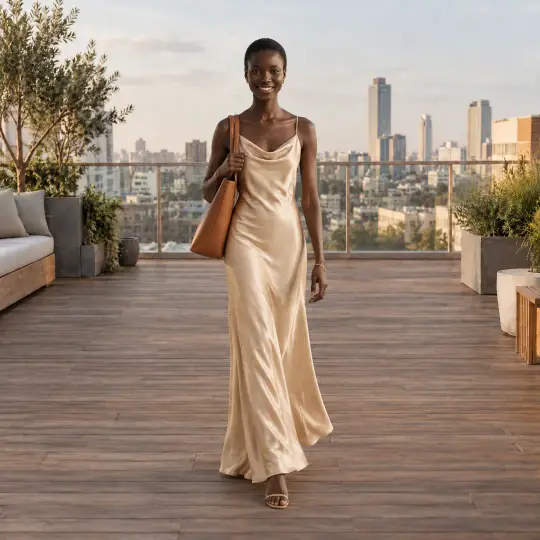
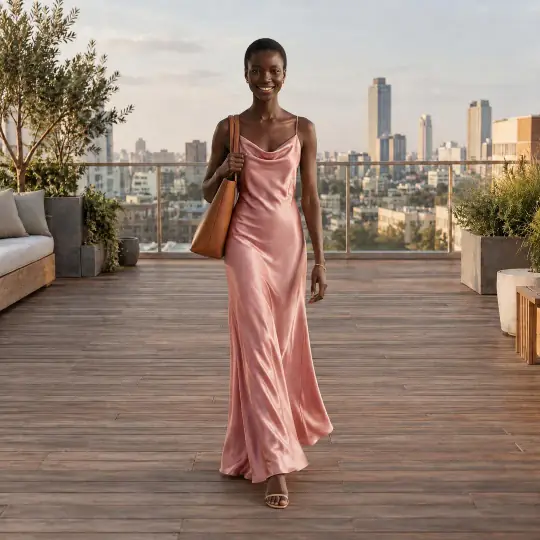
Original
Other colours · Blush pink
Other colours
- Up to 6 colours in one go, each its own new image labelled with the colour.
- 19 colours to tap, plus your own.
- Colours are added to the same shoot.
Fix something
- Tap a suggestion or describe the change in your own words.
- You get a new version of the same image.
- History shows what was fixed.
How it works
How do I show a product in other colours without reshooting?
- Open a finished imageChoose Other colours or Fix something from its menu.
- Say what changesTap colours, or tap a suggestion or write what to fix.
- Compare and keepThe face, pose and scene are kept. Only the change is made.
What it costs
How much does it cost?
Per image
5 credits per photo
- Example: three new colours is 15 credits.
- Make again on a colour repeats the same colour edit.
Introductory prices today. Credits never expire while your account is open, whether they come from a pack, a top-up or a monthly plan. See packs and plans.
Good to know
Before you start
- Best for colour changes, removing jewellery, small corrections and background swaps.
- Check that print and text stay correct before you publish.
- Models under 18 allow preset colour edits only, not your own words.
Questions
Photo edits FAQ
How many colours can I make at once?
Up to 6 in one go. There are 19 colours to tap, plus your own.
Will the model look different?
No. The face, pose, framing and scene stay as they are; only the change you asked for is made.
What can Fix something change?
Small things: a colour, an accessory, a detail you don't like. Tap a suggestion or write it yourself.
More from Aaina
Keep going
Every feature works on the same shoots and the same credits.